
Are you tired of doing "Empty Trash" immediately after delete?
did you ever wanted to look in the trash and remove directly a file or two? without empting the whole trash can?
this is one feature that Apple over-looked, but windows switchers miss.
well miss no more, i have written an AppleScript (PermDelete) that allows the deletion of a file or several files or folder/s immidiately without going through the Trash.
I used "Spark" which is a cool free utility that runs a demon that allows you to keep keyboard shortcuts and bind them to AppleScript, Applications, Documents etc. once you click that combination anywhere in leopard (or Tiger), the demon traps it, and execute the appropriate operation you tolled it to, in our case Shift+Delete (not backspace) to execute the PermDelete AppleScript.
How will it Work?
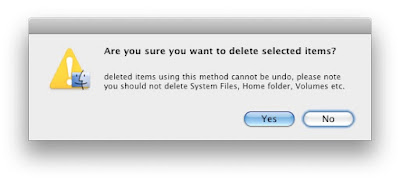
while in Finder you can select files and folders and press Shift+Delete (not backspace) and a dialog will appear asking are you sure you want to delete this? if you press "OK" then the selected files and folders are deleted forever without a possibility to undelete or going to the trash to find them, if you press "Cancel" the script aborts and the deletion is canceled.
another benefit you get from this is that you can goto the trash and remove single or multiple items from the Trash without the need to empty the whole trash, just by selecting and pressing Shift+Delete (not backspace).
What is Apple Script?
AppleScript is Mac plugin script language, it is the VB for mac, it allows interaction with every application there is, activate features of that Application, control parts of the OS, even after an application has launched it can be manipulated, given instructions just as if you used its API or a user pressed on the menus and buttons, i will cover AppleScript in the comming posts on Dev4Mac.
What Do i need for the Task?
- Download this Script (i wrote it, use it freely)
- Download Spark utility
How to Install?Install Spark Utility (very straight forward, mount the DMG, copy to Utilities or Applications)
execute Spark
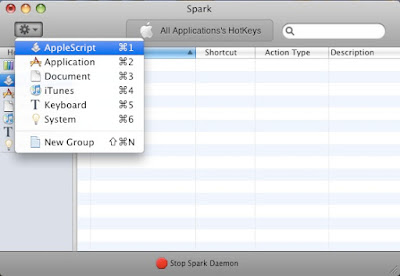
add the PermDelete script to the AppleScript HotKey Group like this:
from the Option drop down menu on the upper left corner choose "AppleScript".
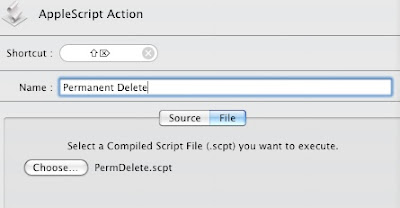
next choose your keyboard shortcut (i used Shift+Delete)

write some meaningful name to this shortcut, and choose "File" tab and select the previously downloaded permDelete script
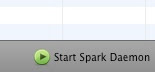
lastly press the start button on the bottom of the screen so the Spark Demon can start working
that's it, try it.
you should get this dialog any time you try to permanently delete a file
 one thing to remember
: if you want this feature to be available from now on, you need the Spark demon running at all time, make it load at startup (if you stated so in the first run, or you can add it to your startup items look howto here). also if you alter the script then you should restart the demon from the application so changes will take effect, just run it again and from the screen press stop and start on the bottom button.
Enjoy.


